> For the complete documentation index, see [llms.txt](https://docs.ispecalgo.com/llms.txt). Markdown versions of documentation pages are available by appending `.md` to page URLs; this page is available as [Markdown](https://docs.ispecalgo.com/en/isa-terminal/baza-znanii/vnutrennie-tipy-orderov-v-isa.md).
# Order types
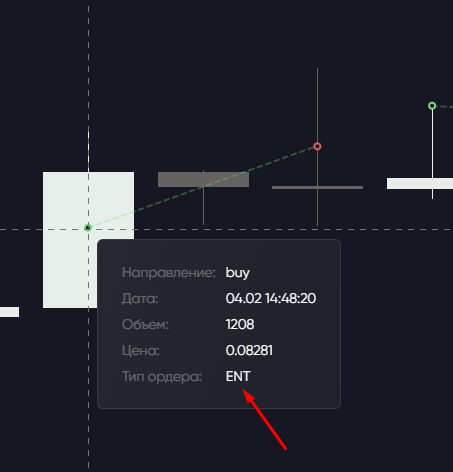
Short labels beside orders and trades in tables and charts show what a bot did: entered, averaged or closed a position.
## Labels
| Label | Meaning |
| ------- | ------------------------------------------ |
| **ENT** | Position entry |
| **AVG** | Averaging: increasing the position |
| **ETP** | Take-profit close |
| **PTP** | Partial exit: closing part of the position |
| **ESL** | Stop-loss close |
| **EMR** | Market close through the terminal |
| **FUN** | Futures funding payment or charge |
| **LIQ** | Forced exchange closure: liquidation |
FUN and LIQ describe exchange events, not orders you place manually. PTP means the bot intentionally closed part of a position and continues managing the rest; this differs from an exchange partially filling an order.
## In history
The **Type** column shows exit labels ETP, PTP, ESL, EMR, FUN or LIQ. Some entries may use a general name such as “Trade”.
## On the chart
| Action | Marker |
| ------------------- | -------------- |
| ENT entry | Arrow |
| AVG averaging | Arrow with “+” |
| PTP partial exit | Arrow with “−” |
| Full position close | Cross |
| FUN funding | Circle |
Actions for one position are connected chronologically by lines. Hover over a marker: PTP shows the closed part's result; a full close shows the entire position's result. Layout may differ by terminal version.